Sendspin Bluetooth Bridge
by trudenboy · io.github.trudenboy.sendspin-bt-bridge
Not TrustedWeb appUnrated★ 279 stars
Make any Bluetooth speaker smart.
Make any Bluetooth speaker smart. DIY multi-room audio with Music Assistant, Home Assistant AI automations & Sendspin protocol. Docker, HA addon, Raspberry Pi, Proxmox LXC. Free & open-source.
Screenshots
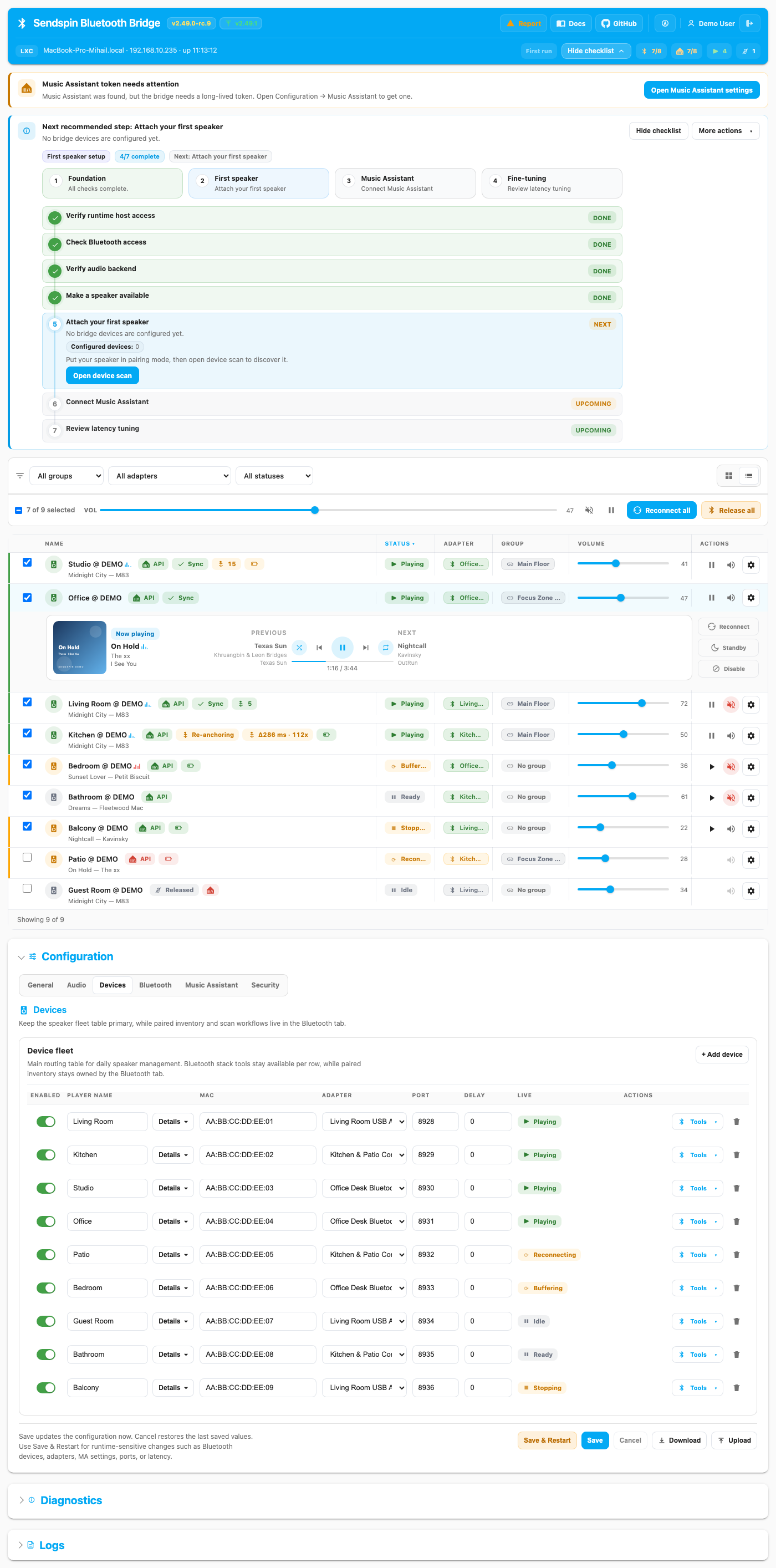
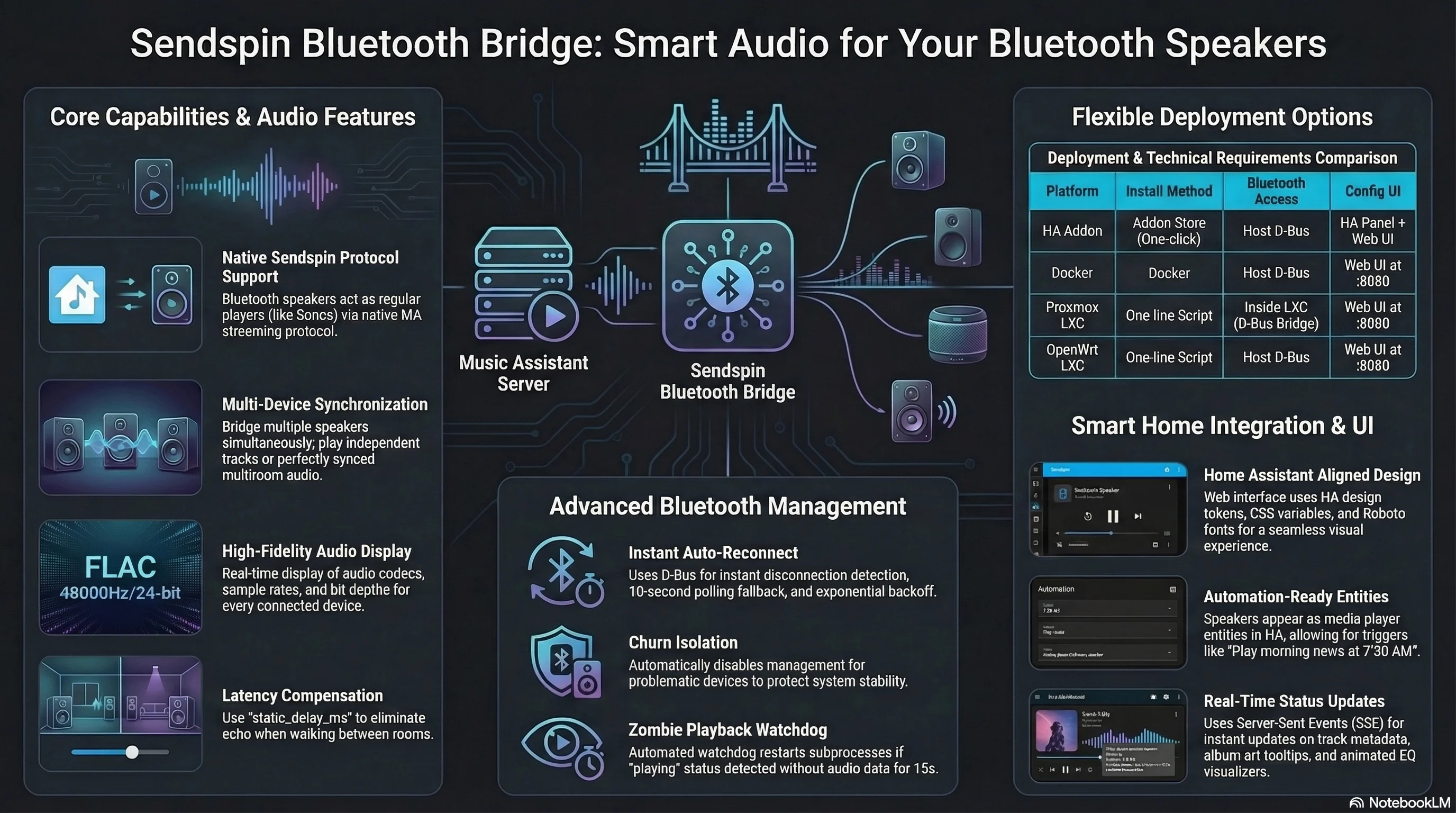
Sendspin Bluetooth Bridge dashboard screenshot Sendspin Bluetooth Bridge infographic — features, architecture and deployment options
About
🏠 Landing Page · 📖 Documentation · 🚀 Live Demo · 💜 Sponsor · RU Русская версия Turn Bluetooth speakers and headphones into native Music Assistant Sendspin players. Sendspin Bluetooth Bridge is a local-first, headless-friendly bridge for Home Assistant, Docker, Raspberry Pi, and LXC deployments. Each Bluetooth device appears in Music Assistant as its own player, with web UI management, diagnostics, and multi-room-friendly deployment options. Sign-in: this app keeps its own accounts. Each member signs up or signs in inside the app with an app username and password; the hub remembers each member's session. The import did not test signing in (no sign-up form found to test the cookie jar with). Sendspin Bluetooth Bridge is the open-source project trudenboy/sendspin-bt-bridge (https://github.com/trudenboy/sendspin-bt-bridge) by trudenboy, released under MIT. Ion packages it unmodified from commit 3c50b567985d, adding only a manifest, an icon and a start script.
Source
Written by trudenboy, published to Oikou by Ben Grande.
- ★ 279 stars on GitHub
- Licence: MIT
- Upstream version v2.75.0
- Built from commit 3c50b567985d
Age rating
Not rated. Nobody has said who this app is suitable for, so Personal Clouds and the Oikou app treat it as 18+.
What version 2.75.0 may do
Internet
It asks to reach these hosts, and no others:
- sendspin-bt-bridge.pages.dev
- trudenboy.github.io
- fonts.googleapis.com
- img.shields.io
- www.home-assistant.io
- sendspin-demo.onrender.com
- community.home-assistant.io
- mc.yandex.ru
- translate.googleapis.com
- www.music-assistant.io
- www.sendspin-audio.com
- fonts.gstatic.com
- my.home-assistant.io
- raw.githubusercontent.com
- ogp.me
- www.clarity.ms
- www.googletagmanager.com
- cdn.jsdelivr.net
Containers on your Personal Cloud’s computer
Can see, start, stop, create and remove containers on your Personal Cloud’s computer, and download images: Lists, updates and restarts your Docker containers
You choose the level on your Personal Cloud, and can give less. It never sees your Personal Cloud’s own containers or other apps’ ones, and cannot create containers with your folders or extra privileges.
Bluetooth
Can find the Bluetooth devices near your Personal Cloud’s computer (names, signal strength), which can tell whose phones and watches are around, and connect to them and read them: Finds the Bluetooth devices nearby, connects to them and reads their data
Asks for BlueZ in its container (Personal Clouds on Linux).
You choose the level on your Personal Cloud, and can give less. Each scan and each new connection needs your approval unless you allow it always, and it names devices by identifiers of its own unless you give it their real addresses.
USB and serial devices on your Personal Cloud’s computer
- Can use a USB device plugged into your Personal Cloud’s computer that you choose (raw access can change its settings or firmware): The USB device it talks to (usb-device)
You pick one device for each on your Personal Cloud, and can let it only read it. It gets that device alone, never the others plugged in; one it may write to is its to command.
The speakers of your Personal Cloud’s computer
Can play sound on the speakers of your Personal Cloud’s computer: Plays sound on your hub computer's speakers
You choose whether it plays, the output device and how loud it may be, and can mute it. It can never record, and hears no other app’s sound.
Personal Cloud tools
None. It uses nothing from your Personal Cloud beyond its own storage.
Notifications
It does not send push notifications.
Storage
Up to 512 MB on your Personal Cloud.
Its address
Works best with its own address. A Personal Cloud shared through Cloudflare can give it one; on a private Personal Cloud on Tailscale it opens under your Personal Cloud’s address, where it may not work fully. Private and shared Personal Clouds
Add to Personal Cloud
Sign in to add this web app to a Personal Cloud of yours. It runs there, on your own computer, and you open it from there; nothing is installed on your phone.
Versions
2.75.0 Latest Shown above
Published · a ready-built bundle
Imported from trudenboy/sendspin-bt-bridge at 3c50b567985d (v2.75.0).